AI Automation, South Bend, Indiana

AI Automation & Integration for Your Business.

I'm Bryan Arambula, a developer based in South Bend. I build AI assistants and automated workflows that answer customers, read forms and documents, and work with the software you already use, for businesses in Michiana and across the country.

service-request-form
  1. 01

    A request comes in

    A customer submits your service form with a few photos.

  2. 02

    AI reads it

    It pulls out the name, address, service needed, and urgency.

  3. 03

    Unclear ones wait for you

    Anything it isn't sure about is set aside for a person.

  4. 04

    It lands in your system

    The job is created and the customer gets a confirmation.

Illustrative example of a form-intake workflow

Examples

What I Build With AI

AI is most useful on a specific, repeated task. These are the kinds of work I connect it to, with a person still in charge of the result.

AI Chat Assistants

Website chat and text-message assistants that answer from your services, hours, and FAQs, then hand the conversation to a person when it needs one.

Today
Questions wait until someone is free to answer them.
With AI
Customers get an answer right away, and you can read the whole conversation.

Form & Document Processing

AI that reads submitted forms, PDFs, and emails, pulls out the details you need, and enters them where they belong. Unclear entries are flagged for review.

Today
Someone retypes each submission into another system.
With AI
The details are filled in for you, with exceptions set aside for a person.

Review Analysis & Replies

AI that reads your customer reviews, sums up what people praise and complain about, and drafts replies in your voice for you to approve.

Today
Reviews pile up and replies get written when there's time.
With AI
Each review has a drafted reply waiting for your edit and approval.

AI in Your Existing Software

Connect an AI model to the tools you already use, such as your CRM, scheduling, email, or spreadsheets, where their APIs and permissions allow it.

Today
Information gets copied between tools by hand.
With AI
One step triggers the next, and the AI handles the reading and writing in between.

Have a task that isn't listed? If it involves reading, writing, sorting, or answering the same kinds of things over and over, it's worth a conversation. For a full application with accounts, dashboards, or billing, see custom software. For a public site or online store, see website development.

AI I've Already Built

SimplAssist: AI That Answers When You Can't.

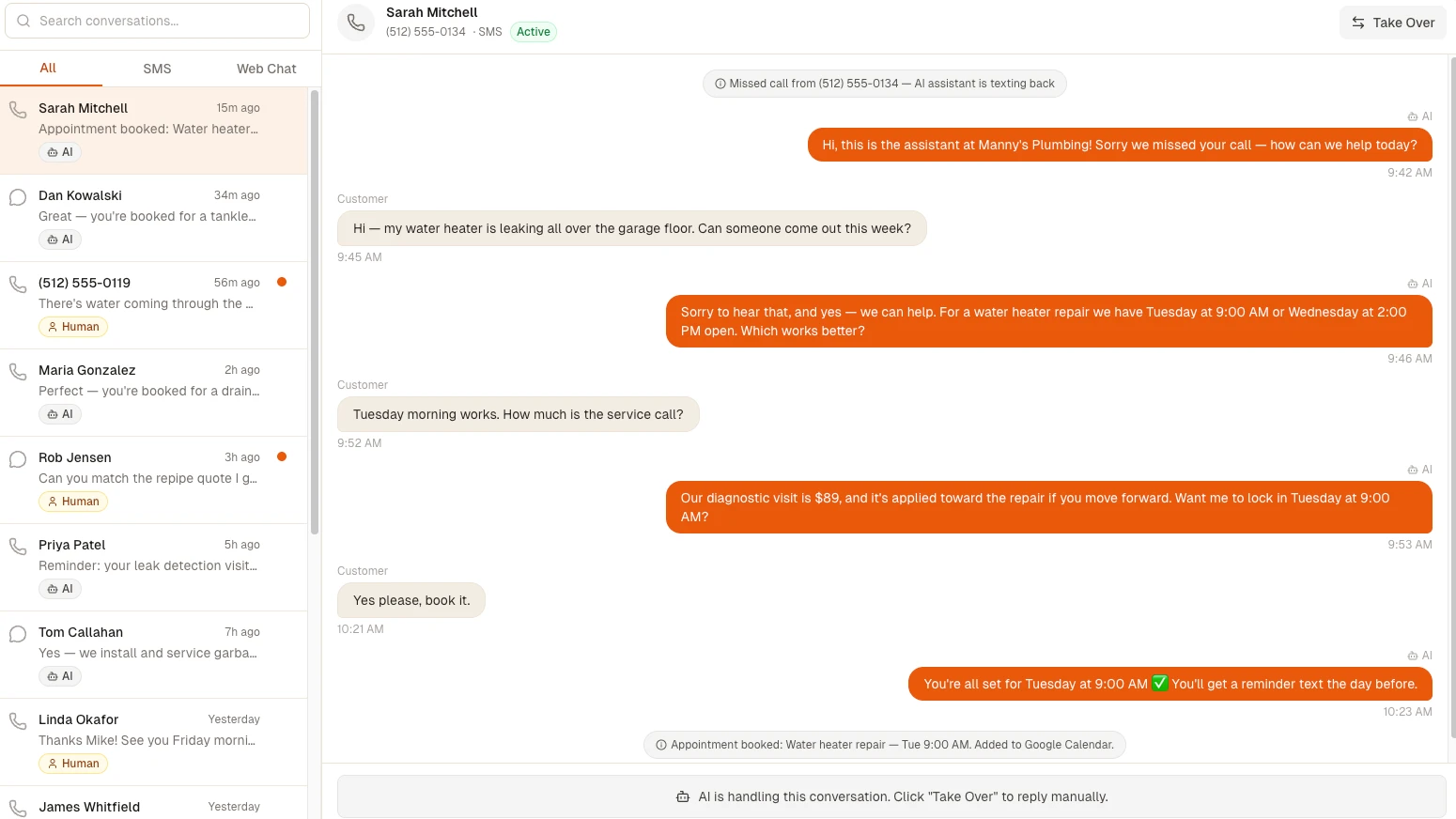
SimplAssist is a product I designed and built. It texts back missed calls, holds AI conversations over text message and website chat, keeps leads in one inbox, and books appointments through Google Calendar.

It knows the business
Replies draw on each business's own profile, services, FAQs, and hours.
One inbox for every channel
Text messages and website chat lead into a shared inbox, so a person can step in.
More than the AI reply
Accounts, onboarding, billing, email, and booking are all part of the product around it.
simplassist.com
SimplAssist's shared inbox showing a demo missed-call conversation that leads to a booked plumbing appointment.
SimplAssist inbox, shown with demo data

I also built SimplSEO, which includes an AI mentor that explains a site's Google Search Console data in plain English. Both products are on the custom software page.

Approach

How I Keep AI Reliable

A demo is easy. A tool your team can trust every day takes a few rules that are agreed before it goes live.

01

It answers from your information

The AI is given your services, policies, and documents to work from, and is told what to do when the answer isn't there.

02

A person stays in the loop

You decide which steps run on their own and which wait for approval. Unclear cases go to a person.

03

You know where your data goes

Before anything is built, we go over what information is sent to the AI provider, which accounts it runs under, and what should stay out.

Process

Start With One Task

You don't need an AI strategy to begin. One well-chosen task shows what AI can do for your business, and what it can't.

  1. Step 1

    Pick one task

    We talk through a task that eats your time: what starts it, who handles it, and what a good result looks like.

  2. Step 2

    Test with real examples

    I build a small version and run it on your actual forms, messages, or reviews so you can judge the output yourself.

  3. Step 3

    Connect your tools

    The working version is connected to your software, with review steps and a manual fallback if something fails.

  4. Step 4

    Launch and adjust

    Your team starts using it. We watch the results, fix what it misses, and agree on support and running costs.

Questions

Common Questions About AI Projects

What is AI automation?

It means using an AI model, like the ones behind ChatGPT or Claude, to handle a step in your work that used to need a person to read, write, or decide: answering a question, reading a form, drafting a reply. I build that step into your existing process and connect it to the tools you already use.

Do you offer AI consulting, or only development?

Both. Many projects start as a consultation: we look at one workflow and decide whether AI fits, or whether an existing product would do the job. If a custom build makes sense, I'm the developer who builds it, so nothing is lost in a handoff.

How much does an AI project cost?

It depends on the task, the tools involved, and how much human review you want. There are two parts: the cost to build and connect it, and the usage fees charged by the AI provider, which grow with volume. You get a quote after we walk through the workflow, and the first consultation is free.

Which AI models do you use?

I'm not tied to one provider. Most of what I've built so far runs on the OpenAI and Anthropic (Claude) APIs, and I choose per project based on the task, the cost, and your data requirements. That can also mean Google's Gemini, an open-source model, or a model running on your own hardware when information shouldn't leave your business. I build so the model can be swapped later as better or cheaper options come out.

Do I have to replace the software I use now?

Usually not. Most projects connect AI to tools you already have through their APIs or exports. If a tool has no way to connect, we look at the alternatives before anything is built.

What happens when the AI gets something wrong?

AI makes mistakes, so every project includes review steps, limits on what the AI can do on its own, and a manual fallback. We test with your real examples before launch and decide together which actions need a person's approval.
South Bend, Michiana & Nationwide

Have a Task AI Could Take Over?

Tell me about one task that takes too much of your time. I'll tell you whether AI is a good fit and what a first version would involve. Free consultation, no strings attached.